Question: What do I need before using my Laser Portable LED Projector?
Answer:
Model reference: PJ-TUHW1W-339
Applies to: PJ-TUHW1W-339
If your SKU differs, search our support page by your Model SKU to find the correct article.
The Laser 720P HD Portable Projector - White includes:
- Portable LED Projector
- Remote control
- AC power cord
- User Manual
You may also need:
- Two AAA batteries for the remote control
- An HDMI cable when connecting a compatible HDMI device
- Your Wi-Fi password when connecting the projector to a wireless network
Before first use:
1. Remove all packaging materials.
2. Place the projector on a flat surface.
3. Leave enough space around it for airflow.
4. Install two AAA batteries in the remote control.
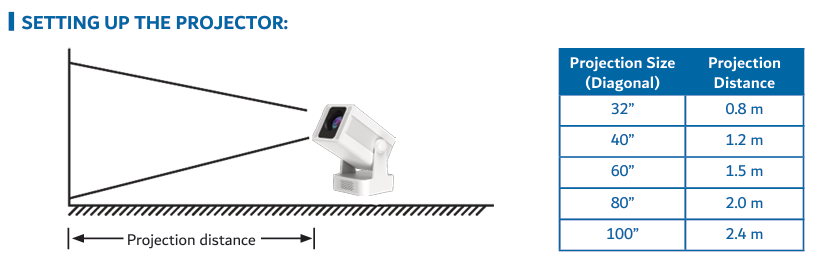
5. Position the projector according to the required image size.
The manual lists these approximate projection distances:
- 32-inch image: 0.8 metres
- 40-inch image: 1.2 metres
- 60-inch image: 1.5 metres
- 80-inch image: 2.0 metres
- 100-inch image: 2.4 metres
For the best picture quality, place the projector as close to the centre of the projection surface as possible.
Was this article helpful?
That’s Great!
Thank you for your feedback
Sorry! We couldn't be helpful
Thank you for your feedback
Feedback sent
We appreciate your effort and will try to fix the article