Question: How do I connect Bluetooth headphones or speakers to the Laser Portable Cassette Player?
Answer:
Model reference: SP-CASPLB-322
Applies to: SP-CASPLB-322
The Laser Portable Cassette Player with Bluetooth - Black can send cassette audio to Bluetooth headphones or Bluetooth speakers.
Important: the player cannot receive audio from phones, tablets or other audio source devices.
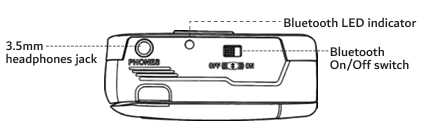
To pair with a Bluetooth device:
1. Turn on your Bluetooth headphones or speaker.
2. Make sure the device is in Bluetooth pairing mode.
3. If other Bluetooth devices are nearby, turn them off to avoid unwanted connections.
4. Start playing a cassette tape.
5. Slide the Bluetooth switch to ON.
6. The Bluetooth LED will start flashing.
7. The player will connect automatically. This may take up to 30 seconds.
When connected:
- Music will play through your Bluetooth headphones or speaker.
- The Bluetooth LED will flash intermittently.
- You can adjust sound using the volume dial or the connected device controls.
After use, switch Bluetooth OFF to disconnect and help save battery power.
Was this article helpful?
That’s Great!
Thank you for your feedback
Sorry! We couldn't be helpful
Thank you for your feedback
Feedback sent
We appreciate your effort and will try to fix the article