Question:
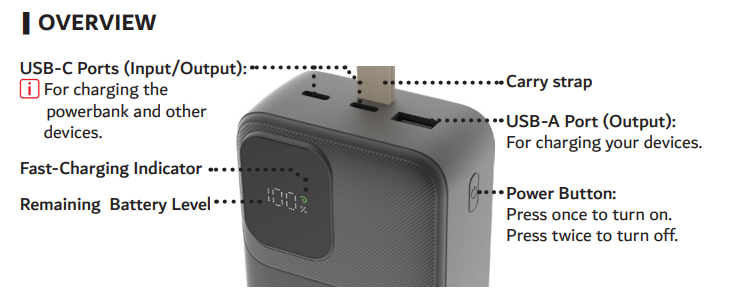
How does the power button work on this powerbank?
Answer:
Model reference: PB-LP30BK-608
Applies to: PB-LP30BK-608
If your SKU differs, search our support page by your Model SKU to find the correct article.
Step 1: Press the power button once to turn on.
Step 2: Press the power button twice to turn off.
Step 3: Use the button to wake the display to check the remaining battery percentage.
This guidance applies to the Laser Powerbank PB-LP30BK-608 (30,000mAh).
Was this article helpful?
That’s Great!
Thank you for your feedback
Sorry! We couldn't be helpful
Thank you for your feedback
Feedback sent
We appreciate your effort and will try to fix the article