Question: How do I pair the remote control?
Answer:
Model reference: PJ-AF450B-028
You must pair the remote before first use.
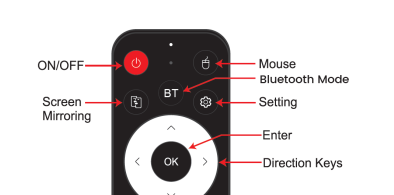
Press the BT button on the remote.
Press and hold the Left and Right buttons together for 4 seconds.
The remote light will begin flashing.
Release the buttons and pairing will complete automatically.
If pairing fails, repeat the steps with fresh batteries.
Note:
If you factory reset the projector, the Bluetooth remote will be disconnected. You will need to pair the remote with the projector again before you can use it.
Was this article helpful?
That’s Great!
Thank you for your feedback
Sorry! We couldn't be helpful
Thank you for your feedback
Feedback sent
We appreciate your effort and will try to fix the article