Question: How do I adjust focus and keystone on my projector?
Answer:
Model reference: PJ-AF450B-028
Your projector supports both auto and manual adjustment.
Auto Focus and Auto Keystone
The projector automatically adjusts focus and screen shape each time it turns on.
Manual Focus
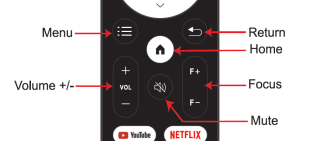
Use the F+ or F- buttons on the remote.
Manual Keystone Correction
Go to Settings - Manual Keystone.
Use the navigation keys to adjust each corner.
Press OK to confirm.
Press Menu to reset if needed.
This applies to the Full Product Name: Laser 1080p Smart Android Projector Auto Focus.
Was this article helpful?
That’s Great!
Thank you for your feedback
Sorry! We couldn't be helpful
Thank you for your feedback
Feedback sent
We appreciate your effort and will try to fix the article