Question: How do I connect a Bluetooth speaker to my Laser Smart Portable Projector?
Answer:
Model reference: PJ-TUHA1CW-346
Applies to: PJ-TUHA1CW-346
If your SKU differs, search our support page by your Model SKU to find the correct article.
The Laser 720P HD Smart USB-C Portable Projector - White supports Bluetooth 5.2 audio output to a compatible Bluetooth speaker.
To connect a speaker:
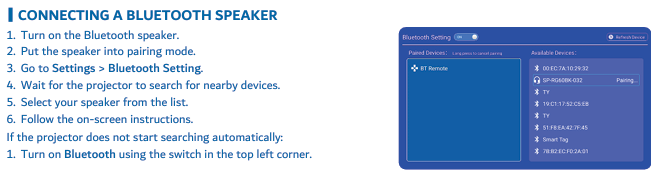
1. Turn on the Bluetooth speaker.
2. Put the speaker into pairing mode.
3. On the projector, go to Settings > Bluetooth Setting.
4. Wait for the projector to search for nearby devices.
5. Select your speaker from the list.
6. Follow the on-screen instructions.
If the projector does not start searching, turn on Bluetooth using the switch in the top-left corner of Bluetooth Settings.
Bluetooth is for audio output only. It does not provide video input.
Was this article helpful?
That’s Great!
Thank you for your feedback
Sorry! We couldn't be helpful
Thank you for your feedback
Feedback sent
We appreciate your effort and will try to fix the article