Question:
How do I change or turn off the lights on the Laser RGB Party Speaker?
Answer:
Model reference: SP-RG60BK-032
Applies to: SP-RG60BK-032
If your SKU differs, search our support page by your Model SKU to find the correct article.
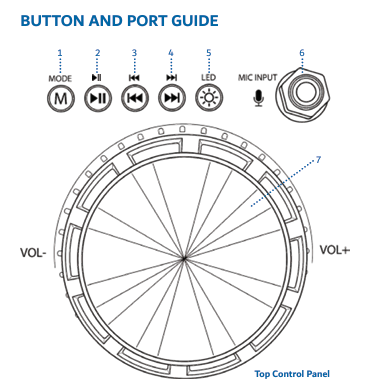
Use the LED light button on the speaker control panel.
- Press the LED light button to change the light effect.
- Press and hold the LED light button to turn the LED lights on or off.
The supplied specifications confirm the speaker has RGB party lights, 10 light effects, and the lights can sync to music.
Was this article helpful?
That’s Great!
Thank you for your feedback
Sorry! We couldn't be helpful
Thank you for your feedback
Feedback sent
We appreciate your effort and will try to fix the article