Question: How do I charge the NRGVault 100W Portable Power Station?
Answer:
You can charge the power station using either USB-C or DC input.
USB-C charging:
Use the included USB-C to USB-C PD cable.
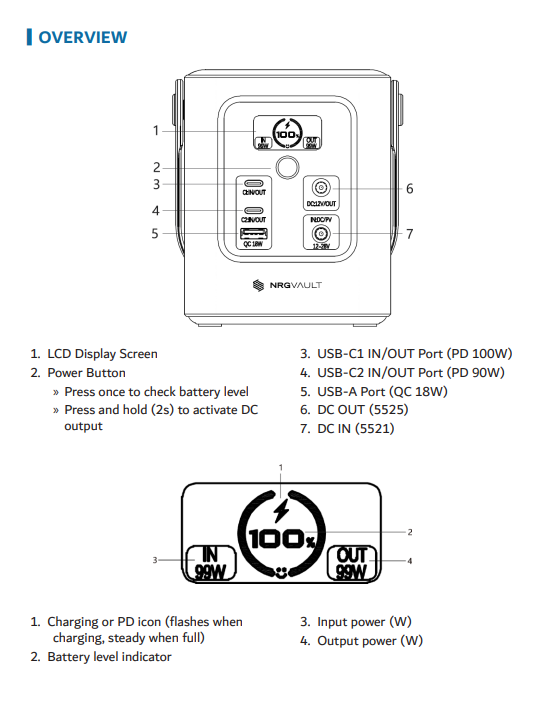
Connect it to either the USB-C1 or USB-C2 port on the power station.
Plug the other end into a 60–100W USB-C power source such as a wall charger, laptop, or car charger.
Charging starts automatically.
DC charging (car or solar):
Connect a suitable DC source to the DC IN (5521) port.
Supported input voltage is 12–28V, including car chargers or compatible solar panels.
While charging, the charging icon on the LCD flashes. When charging is complete, the icon stays solid.
This applies to the NRGVault 100W Portable Power Station.
Was this article helpful?
That’s Great!
Thank you for your feedback
Sorry! We couldn't be helpful
Thank you for your feedback
Feedback sent
We appreciate your effort and will try to fix the article