Question: How do I play music using AUX with the Laser Lava Lamp Bluetooth Speaker?
Answer:
Model reference: SP-LAVABK-762
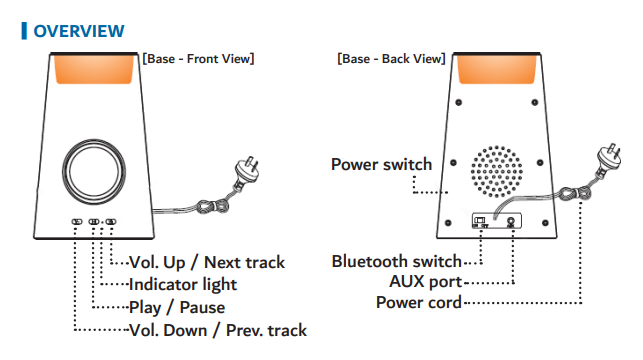
To play audio through AUX:
Turn on the lamp.
Insert the included 3.5mm AUX cable into the AUX port.
The lamp automatically switches to AUX mode.
Start playing audio on your device.
Important notes:
Playback controls such as next, previous, and pause must be done on your device.
The lamp always starts in Bluetooth mode first. To switch to AUX, unplug and reinsert the cable.
This applies to the Full Product Name: Laser Lava Lamp with Bluetooth Speaker – Black.
Was this article helpful?
That’s Great!
Thank you for your feedback
Sorry! We couldn't be helpful
Thank you for your feedback
Feedback sent
We appreciate your effort and will try to fix the article