Question: How do I connect the wireless controllers to the Laser Smart Gaming Projector?
Answer:
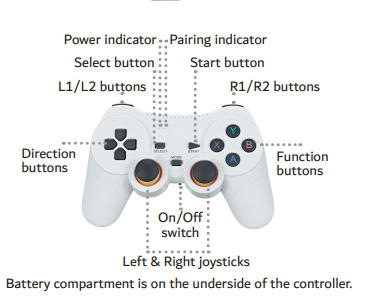
The projector uses a USB Bluetooth dongle for pairing controllers. From the manual :
Steps:
Plug the USB Bluetooth dongle into the projector USB port.
Insert 2 AAA batteries in each controller.
Switch each controller to ON.
Wait for the MODE light to turn blue.
If it does not pair, hold MODE for 2 seconds.
The dongle must stay connected for joystick functions.
Was this article helpful?
That’s Great!
Thank you for your feedback
Sorry! We couldn't be helpful
Thank you for your feedback
Feedback sent
We appreciate your effort and will try to fix the article