Question: How do I insert and format a microSD card in the Laser 2K WiFi Dashcam?
Answer:
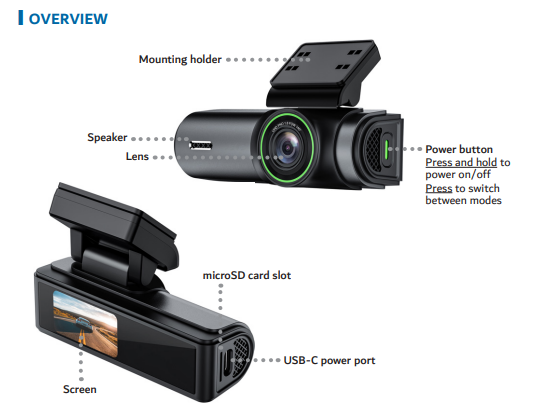
The Laser 2K WiFi Dashcam requires a high-speed UHS U3 microSD card (up to 512GB) for recording. According to the manual , the dashcam should be turned on before inserting the card for the first time.
To insert the microSD card:
Turn the dashcam on.
Insert the card with the contact pins facing the front of the camera.
Make sure the card clicks into place.
To format the microSD card:
Open the Roadvideo app.
Go to Camera Settings.
Scroll down and tap Format.
Confirm to erase and prepare the card.
Model reference: Full product name is Laser 2K Dash Camera WiFi App Control Black.
Was this article helpful?
That’s Great!
Thank you for your feedback
Sorry! We couldn't be helpful
Thank you for your feedback
Feedback sent
We appreciate your effort and will try to fix the article